give your self-hosted ai agent a home ip with a spare android phone and tailscale

an old android phone on your home wifi can give your agent’s browser a home ip, for free. set it up when a site blocks your server. don’t expect a smarter agent: in our tests a home ip didn’t reliably help.
why a home ip
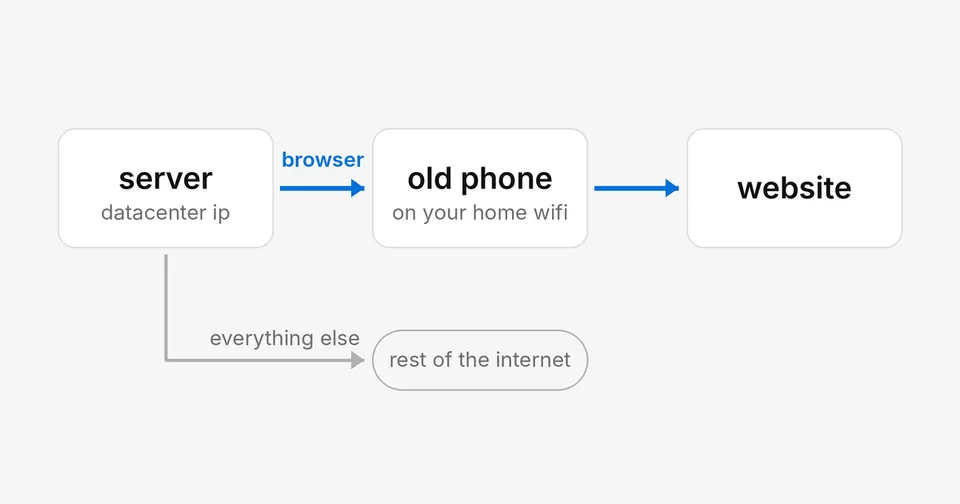
a server has a datacenter ip, and some sites refuse those outright, at login or on every page. a phone at home looks like your laptop. route only the agent’s browser through it and keep everything else on the server’s own line.
you need the phone, plugged in, and a free tailscale account.
1. make the phone an exit node
install tailscale on the phone and sign in. in the app, open exit node and turn on run as exit node. then in the tailscale admin console, open the phone’s machine settings and allow it as an exit node.
set the tailscale app’s battery use to unrestricted. we started with a socks5 proxy app on the phone instead. android killed it about once a day, once overnight in the middle of our benchmark, and the runs sat for five hours. the exit node replaced it.
on a 5dive box, you can ask the main agent to do steps 2 and 3. it has admin rights on its server. you still open the tailscale login link yourself.
2. give the browser its own tailscale on the server
pointing the whole server at the exit node sends everything through your home line: model calls, updates, backups. run a second tailscale in userspace mode instead. it leaves the server’s network alone and opens one socks5 port on localhost:
sudo mkdir -p /var/lib/tailscale-browser /run/tailscale-browser
sudo tailscaled --tun=userspace-networking \
  --socks5-server=127.0.0.1:1055 \
  --state=/var/lib/tailscale-browser/tailscaled.state \
  --socket=/run/tailscale-browser/tailscaled.sock --port=0 &
sudo tailscale --socket=/run/tailscale-browser/tailscaled.sock up \
  --hostname=server-browser --exit-node=<phone's tailscale ip>
check it. this should print your home ip:
curl --socks5-hostname 127.0.0.1:1055 https://ifconfig.mefor a box that reboots, put the tailscaled line in a systemd unit.
3. point the browser at it
any chrome takes --proxy-server=socks5://127.0.0.1:1055. in 5dive it’s one command for the agent’s browser:
5dive browser proxy set socks5://127.0.0.1:1055set it before the agent logs in anywhere. a site that sees the ip change mid-session can sign you out. while the proxy is set, you can’t sign in to some sites, google among them.
keep the port on 127.0.0.1. the phone only serves your own tailnet, so nothing is open to the internet. a proxy app listening on 0.0.0.0 is an open proxy on your home network.
what it changed
we ran the same 100 live website tasks (Online-Mind2Web) with 5 browser agents, all on claude haiku 5.5, from a datacenter (that run) and through the phone.
- first run: one agent got better. claude in chrome went from 29 to 51 tasks (p < 0.001). the other four moved 4 to 8 tasks either way, inside chance. two were ours: 5dive browser in pi, and in claude code, where it went from 32 to 24.
- in that first run, bot walls barely dropped: about 19 per 100 tasks from home, 22 from the datacenter.
- a second run didn’t repeat it. on nov 8 we ran claude in chrome and 5dive browser from home again, on newer versions. claude in chrome hit its weekly plan limit partway, so 71 tasks ran on both. on those, claude in chrome passed 28 from home and 29 from the datacenter. 5dive browser passed 34 and 30. both inside chance.
- a cloud host’s sign-up through the phone still went to manual review and was refused.
use github.com/5dive-ai/5dive to self-host.
use 5dive.ai for a managed box.